Hello Creators!
Kling AI is back with another major update — introducing “Elements,” a feature that lets creators combine up to four images to generate videos with improved consistency. This upgrade significantly enhances object continuity, movement, and expressions, making AI-generated videos more seamless than ever.
What is Kling AI’s “Elements” Feature?
The “Elements” feature is designed to improve the coherence of AI-generated videos by allowing users to input multiple reference images. Instead of generating frames that might look slightly different from one another, Elements ensures that:
- Objects, backgrounds, and characters remain consistent throughout the video.
- Movements feel fluid and natural rather than disjointed.
- AI-generated expressions and poses match seamlessly across frames.
By giving AI more context with multiple reference images, Elements helps maintain a unified visual identity across scenes — a crucial feature for storytelling, advertising, and content creation.
Key Features of “Elements”
1. Multi-Image Input for Video Consistency
Creators can now upload up to four images to guide the AI, improving:
- Character consistency — No more characters randomly changing appearance between frames.
- Environmental stability — Backgrounds stay the same, avoiding the AI’s tendency to shift colors or layouts unexpectedly.
- Better transitions — Scenes blend together more smoothly, making videos look more cinematic.
2. Enhanced Object and Expression Control
A common challenge with AI-generated videos is maintaining facial expressions and movement flow. Elements addresses this by:
- Preserving consistent facial emotions across different shots.
- Ensuring body movements align properly, making action sequences look more natural.
This makes Kling AI’s video generation far more reliable for use cases like:
- Marketing campaigns
- Film and animation projects
- Social media content
3. Integration with AI Art Tools
Kling AI’s Elements feature is fully compatible with external AI art tools like Freepik or Midjourney. This means you can:
- Generate a series of consistent characters in Midjourney.
- Upload them into Kling AI’s Elements workflow.
- Produce an AI-generated video where those characters remain visually identical from start to finish.
This synergy between static AI image generation and AI-powered video is a game-changer for digital artists and filmmakers.
How “Elements” Compares to Other AI Video Tools
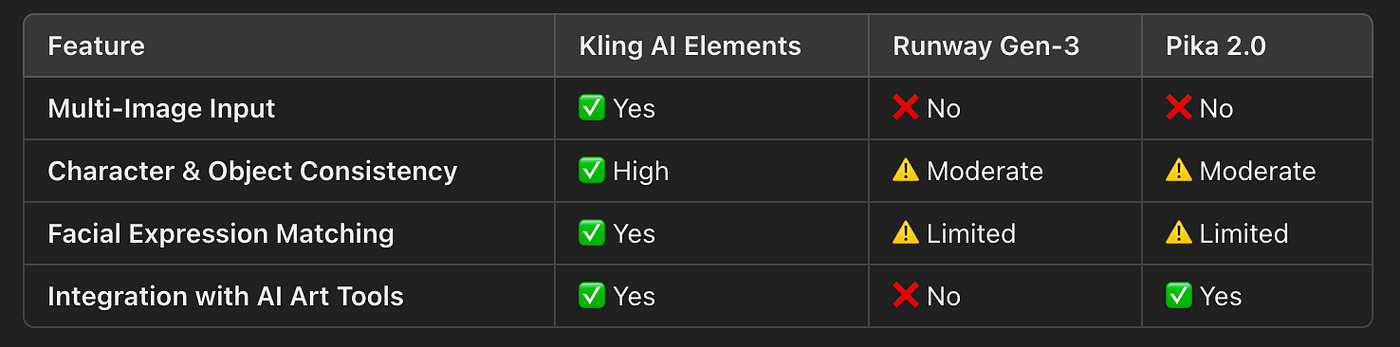
Kling AI’s ability to take multiple images as references gives it an edge over competitors, especially for projects requiring longer, more coherent AI-generated videos.
Final Thoughts: AI Video Just Got More Reliable
AI-generated video has long struggled with maintaining consistency across frames, but Kling AI’s Elements update solves this problem by allowing multi-image inputs for reference. This innovation makes Kling AI one of the most advanced tools for creating AI-powered video content, offering greater accuracy, smoother motion, and seamless character consistency.
As AI-generated filmmaking continues to evolve, this level of control brings us closer to truly production-ready AI video tools.




